How to Systemize Your Coaching Business Before You Scale

Kara Leanne
Scalable Coaching Systems Expert · Updated September 9, 2026
Scalable Coaching Systems builds affordable, done-for-you lead generation and funnel systems for online coaches — because scaling starts with a backend that captures and converts leads automatically.
Get a Free Funnel Strategy →A coaching business is easier to grow when the daily work is clear, repeatable, and not dependent on memory. To systemize coaching business operations, you need simple processes for attracting leads, onboarding clients, delivering sessions, tracking progress, collecting payments, and improving results. This guide walks through practical coaching business systems you can build before you add more clients, offers, team members, or marketing channels.
What should you systemize before you scale?
Before you scale, systemize the work that happens often, affects the client experience, or creates delays when it is handled manually. This usually includes lead intake, sales calls, contracts, payments, onboarding, session delivery, client communication, renewals, offboarding, and basic reporting. You do not need complex software at the start; you need clear steps, owners, templates, and a way to review whether the system is working.
Start with the parts of the business that create the most friction. If clients ask the same questions, create an onboarding guide. If proposals take too long, create a standard offer template. If session notes are scattered, create one central place to store them. The goal is not to remove the human side of coaching. The goal is to protect your time so you can coach more consistently.
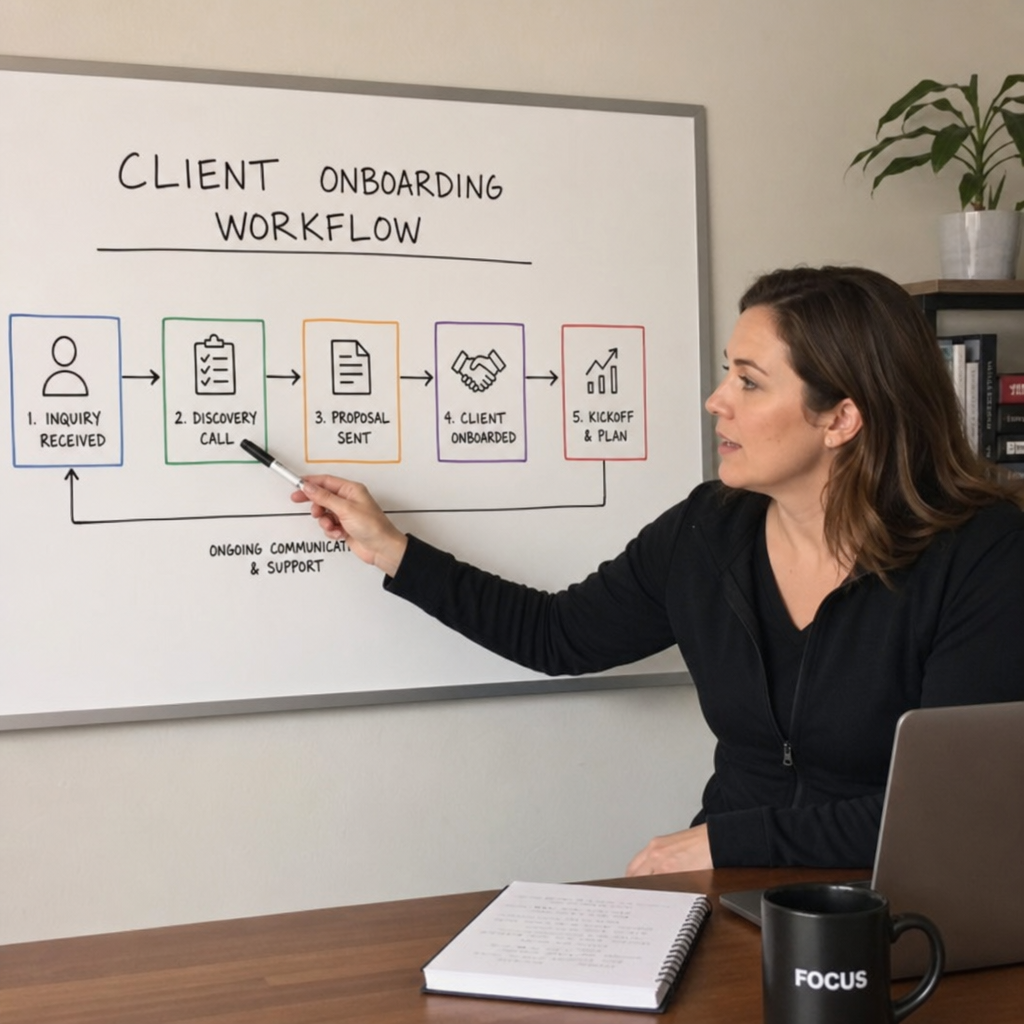
Caption: A visual workflow map helps you see where clients enter, what happens next, and where delays may occur.
Step 1: Map your current coaching workflow
Do not begin by buying tools or redesigning everything. First, write down how your business works today from the moment someone discovers you to the moment they finish working with you. This gives you a clear picture of what already happens, what is missing, and what depends too much on you remembering each step.
List the full client journey
Break the journey into simple stages. For most coaches, these stages include awareness, inquiry, sales conversation, decision, payment, onboarding, coaching delivery, progress review, renewal, referral, and offboarding. Write each stage in order and add the actions that happen inside it.
For example, after a person books a discovery call, you may send a confirmation email, review their intake form, hold the call, send a follow-up message, share a payment link, and answer final questions. If those steps are not documented, they can easily become inconsistent when you get busy.
Identify repeat work and decision points
Once the journey is mapped, highlight the tasks you repeat every week. These are the first candidates for systems. Also mark decision points, such as whether a lead is a good fit, whether a client is ready to renew, or whether a payment issue needs follow-up.
Use this quick checklist to find system gaps:
- Tasks you do more than once a week
- Emails or messages you write from scratch often
- Questions clients ask repeatedly
- Steps that are sometimes forgotten
- Work that only you know how to do
- Files, links, or notes stored in too many places
- Delays that affect client confidence
- Decisions made without a clear standard
The output of this step should be a simple workflow map. It can be a document, whiteboard, spreadsheet, or project board. Keep it practical. If you can look at it and explain how the business runs in five minutes, it is detailed enough for now.
Step 2: Define your core offer and delivery process
A business is hard to systemize when the offer changes every time a new client joins. You can still personalize coaching, but the container should be clear. A defined offer helps clients understand what they are buying and helps you deliver the work in a consistent way.
Clarify the offer structure
Write down the basic details of each coaching offer. Include who it is for, the main goal, the length of the engagement, the session format, the communication boundaries, any materials included, and the expected next step after the program ends. If you have several offers, start with the one you sell most often.
A simple offer outline may include:
- Name of the offer
- Type of client it supports
- Main outcome or focus area
- Number and length of sessions
- Program duration
- Support between sessions
- Client responsibilities
- Coach responsibilities
- Payment structure
- Renewal or next-step options
This does not mean every client receives the same advice. It means the framework is stable. Inside that framework, you can adapt questions, exercises, and recommendations to the client's situation.
Create a repeatable session flow
A session flow gives each coaching conversation a clear shape. This helps you stay focused while leaving room for real discussion. It also makes it easier to review progress because each session creates similar types of notes and next steps.
A basic session flow might look like this:
- Review the client's current status.
- Revisit the action items from the last session.
- Choose the main topic for the current session.
- Coach through the topic using questions, reflection, or exercises.
- Agree on clear next actions.
- Record key notes and follow-up items.
- Confirm the next session date or milestone.
If you use worksheets, exercises, or reflection prompts, store them in one place and link them to the stage where they are most useful. This turns your delivery method into a reliable system instead of a collection of separate materials.
Step 3: Build a lead intake and qualification system
A lead system helps you understand who is interested, what they need, and whether they are a good fit before you spend time on a call. Without this system, you may answer the same questions repeatedly or accept clients who do not match your offer.
Use one clear intake path
Choose one main path for inquiries. This could be a booking form, contact form, email form, or application. The important part is that leads are not scattered across direct messages, inboxes, comments, and notes without a tracking method.
Your intake form should collect only what you need to decide the next step. Too many questions can create friction. Too few questions can make calls inefficient.
Useful intake questions may include:
- What are you looking for support with?
- What result are you hoping to create?
- Have you worked with a coach before?
- What timeline are you considering?
- What have you already tried?
- What would make this coaching engagement successful for you?
- Is there anything important to know before the call?
Create a simple fit standard
Not every interested person is the right client. A fit standard protects both sides. It helps you avoid unclear engagements and makes your sales process more consistent.
Your fit standard can include the client's goal, readiness, budget range, schedule availability, communication style, and whether your coaching method matches their needs. Write down signs of a strong fit and signs that someone may need a different resource.
For example, a strong fit may be someone who has a clear goal, can commit to sessions, is open to reflection, and understands the scope of your coaching. A poor fit may be someone who needs therapy, legal advice, financial advice, crisis support, or a service outside your training and offer boundaries. Keep this standard visible when reviewing applications. If you want a lead intake, qualification, and follow-up system built for you, see our done-for-you lead generation system and our CRM and lead management setup.
Step 4: Standardize your sales and booking process
The sales process should help a potential client make a clear decision. It should not rely on pressure, improvisation, or long custom explanations every time. A standard process also reduces missed follow-ups and confusion around payment or start dates.
Prepare a discovery call structure
A discovery call structure keeps the conversation useful and respectful. It also ensures you cover the same essential topics with each lead.
A simple call structure may include:
- Welcome the person and confirm the call purpose.
- Ask what led them to seek coaching.
- Explore their goal, current situation, and obstacles.
- Explain how your coaching offer works.
- Discuss whether the offer matches their needs.
- Review practical details, such as schedule and next steps.
- Invite questions.
- Confirm the decision path and follow-up timeline.
This structure does not need to sound scripted. It simply gives the call a steady path, so both people leave with the same understanding.
Use follow-up templates
Templates help you respond quickly without sounding careless. Create versions for common outcomes, such as a good-fit lead who wants to join, a lead who needs time to decide, a person who is not a fit, and a person who missed a call.
Example follow-up template:
Subject: Next steps for coaching
Hi [Name],
Thank you for speaking with me today. Based on what you shared about [goal or challenge], the next step would be [offer or action]. This includes [brief summary of format] and focuses on [main area of support].
If you would like to move forward, you can complete [payment, agreement, or booking step] here: [link]. Once that is complete, I will send your onboarding materials and confirm your first session.
Best,
[Your Name]
Keep templates short and specific. Add personal context where needed, but avoid rewriting the entire message each time.
Step 5: Create a smooth onboarding system
Onboarding sets the tone for the coaching relationship. A client who knows what to expect is more likely to arrive prepared, complete required steps, and trust the process. This is one of the most important coaching business systems because it affects every client from the beginning.
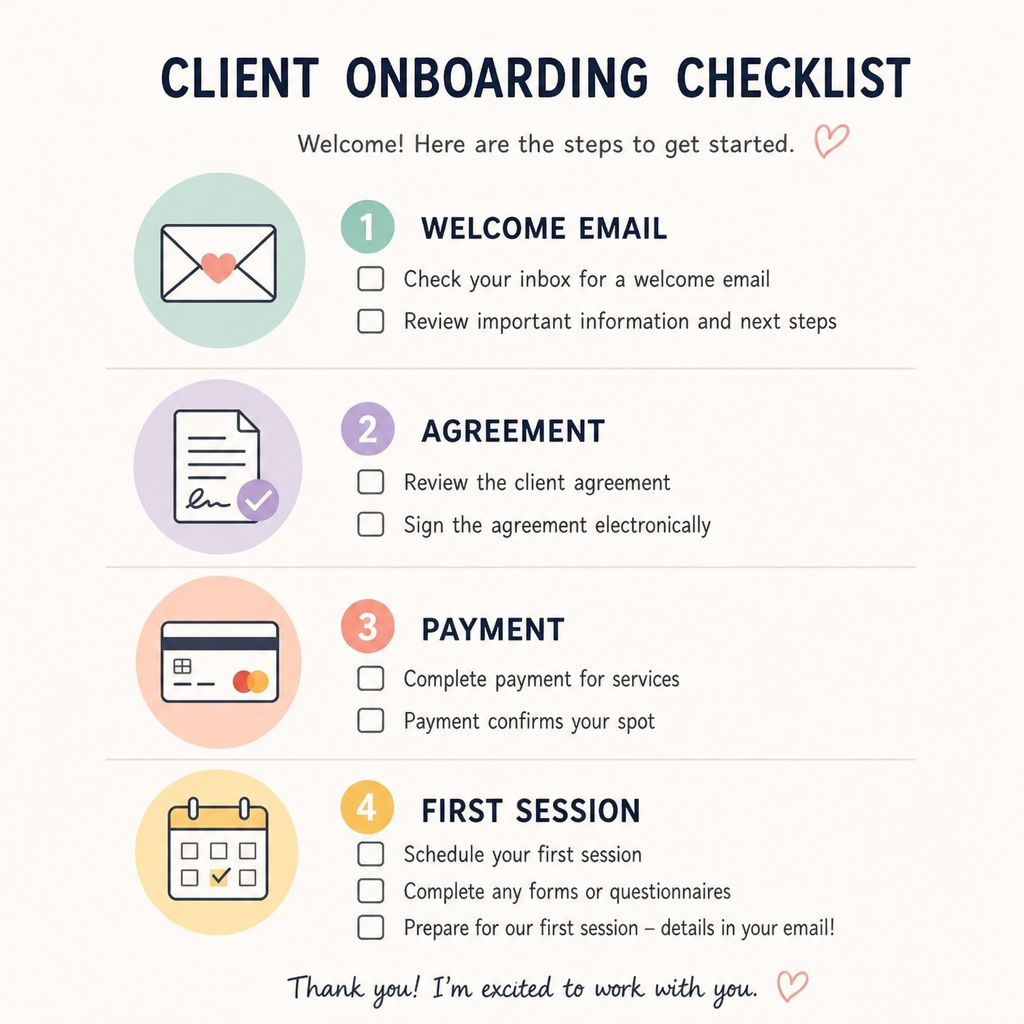
Caption: A clear onboarding checklist helps clients understand what to complete before coaching begins.
Send a clear welcome sequence
Your welcome process should answer the client's first questions before they need to ask. At minimum, it should confirm the engagement, explain what happens next, and provide any forms, links, or preparation tasks.
A simple onboarding sequence may include:
- Payment or deposit confirmation
- Signed agreement or terms confirmation
- Welcome email with program overview
- Intake form or pre-work
- Calendar link or session schedule
- Access to shared folder, client portal, or materials
- Reminder before the first session
If you do not use automation, you can still systemize this with a checklist and email templates. The system is the order of actions, not the software.
Set expectations early
Client expectations should be clear before the first session. Explain how sessions work, how rescheduling is handled, what support is available between sessions, where notes or resources will be stored, and how progress will be reviewed.
This prevents small misunderstandings from becoming larger problems. It also gives clients a clear role in the process. Coaching works better when both coach and client know what they are responsible for.
Step 6: Organize client information and session notes
As your client list grows, scattered information becomes a serious problem. You need a dependable place to store client details, session notes, goals, action items, and important dates. This does not need to be complex, but it must be consistent.
Choose one client record system
Your system could be a spreadsheet, client relationship management tool, project board, or secure client platform. Choose a method that fits the size and privacy needs of your business. The main rule is that every active client should have a record in the same place.
Each client record can include:
- Full name and contact details
- Offer or program type
- Start date and expected end date
- Payment status or billing reference
- Session schedule
- Main goals
- Current focus area
- Key notes from each session
- Action items
- Renewal or offboarding status
Be careful with sensitive information. Store only what you need, use appropriate access controls, and follow any legal or professional requirements that apply to your coaching niche and location.
Use a standard note format
A standard note format makes it easier to review past conversations. It also helps if you later hire support or need to audit your client process.
Example session note template:
Client: [Name]
Session date: [Date]
Main topic: [Topic]
Progress since last session: [Summary]
Key insights: [Notes]
Actions agreed: [Action items]
Resources shared: [Links or files]
Follow-up needed: [Yes or no, with details]
Next session: [Date]
Keep notes factual and useful. Avoid writing long transcripts unless they serve a clear purpose. The goal is to support continuity and accountability.
Step 7: Document your recurring tasks
Documentation makes your business easier to run and easier to delegate. If a task happens more than once, write down the steps. This is how you move from “I know how to do it” to “the business knows how this gets done.”
Start with simple standard operating procedures
A standard operating procedure, often called an SOP, is just a set of instructions for completing a task. It should be clear enough that someone could follow it without asking many questions. Start with tasks that are frequent, important, or easy to forget.
Useful SOPs for coaches may include:
- How to review new inquiries
- How to prepare for a discovery call
- How to send a proposal or payment link
- How to onboard a new client
- How to prepare for a coaching session
- How to send session follow-up notes
- How to track client progress
- How to handle rescheduling
- How to request a testimonial, if appropriate
- How to close or renew a client engagement
Keep each SOP short and usable
A helpful SOP does not need to be long. It should include the purpose of the task, when it happens, who does it, the steps to follow, links to templates, and what “done” looks like.
Example SOP outline:
Task name: Send new client welcome email
Purpose: Start the onboarding process after payment and agreement are complete
Trigger: Client completes required sign-up steps
Owner: [Name or role]
Steps: Confirm payment, check agreement, personalize welcome email, add onboarding links, send email, update client record
Done when: Client has received the welcome email and the client record is updated
Review SOPs as you use them. If a step is unclear, edit it immediately. Documentation should reflect real work, not an ideal version no one follows.
Step 8: Choose tools that support the system
Tools can help you save time, but they cannot fix an unclear process. Choose tools after you know what the system needs to do. This prevents you from paying for software that adds complexity instead of reducing it.
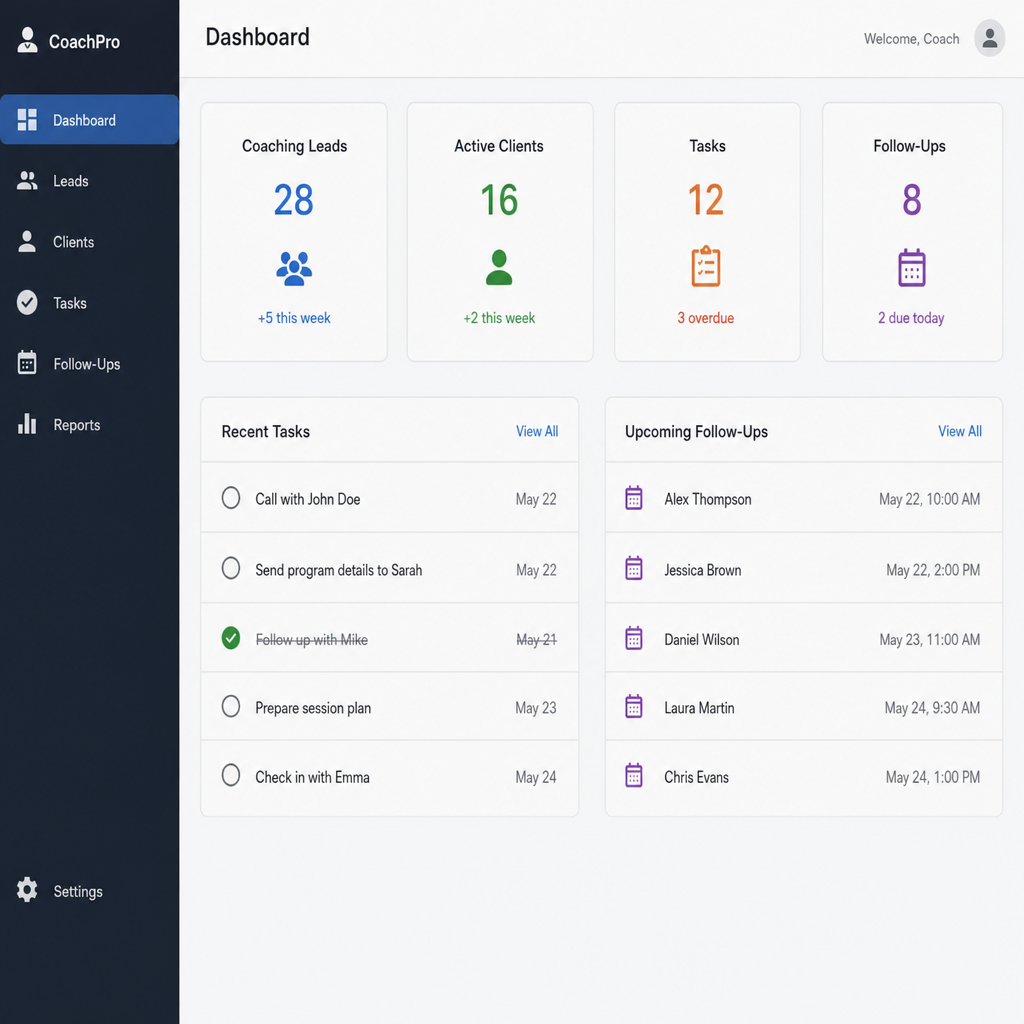
Caption: A basic dashboard can show what needs attention without adding unnecessary complexity.
Match tools to business functions
Think in functions before brands. You may need tools for scheduling, payments, agreements, email, client records, video calls, document storage, task management, and reporting. Some tools combine several functions, while others do one thing well.
Before choosing a tool, ask:
- What process will this tool support?
- Who will use it?
- What information will it store?
- Does it reduce manual work or add extra steps?
- Can it connect with the tools I already use?
- Is it appropriate for the type of client information I handle?
- Can I maintain it as the business grows?
Avoid over-automation too early
Automation is useful when a process is stable. It is risky when the process is still changing. If you automate too soon, you may create confusing messages, duplicate records, or hidden errors.
Start with manual checklists and templates. Once you have used the same process several times and it works well, automate the repetitive parts. This might include booking confirmations, reminder emails, payment receipts, intake form routing, or task creation after a client signs up.
Step 9: Create simple metrics and review habits
Systems need review. A process that worked for five clients may need changes when you have twenty. Build a habit of checking what is working, what is slow, and what clients need more clearly explained.
Track a few useful numbers
You do not need a large dashboard. Start with a few numbers that help you make decisions.
Useful metrics may include:
- Number of new inquiries
- Number of booked discovery calls
- Number of clients started
- Number of active clients
- Missed or rescheduled sessions
- Client completion status
- Renewal interest
- Common client questions
- Time spent on admin tasks
These numbers help you see where growth may create pressure. For example, if inquiries increase but onboarding remains manual and slow, the client experience may suffer. If clients often reschedule, you may need clearer scheduling rules or reminders.
Schedule a monthly systems review
Set a recurring time each month to review your coaching business systems. Look at one area at a time instead of trying to improve everything at once. Ask what caused delays, what clients repeated, what you forgot, and what could be turned into a template.
A monthly review can include:
- Check active client records for missing information.
- Review inquiries and follow-ups.
- Update templates based on common questions.
- Review SOPs that caused confusion.
- Archive old files or completed client records.
- Choose one system improvement for the next month.
This review habit keeps systems current. It also prevents small issues from becoming permanent problems.
Step 10: Prepare to delegate before you hire
Many coaches wait until they are overwhelmed before preparing to delegate. This makes hiring harder because the new person has to learn from scattered instructions. If you document tasks early, you can hand off work more calmly when the time comes.
Separate coaching work from support work
List all the tasks you do each week. Then separate the tasks that require your coaching judgment from the tasks that support the business. This helps you see what could eventually be delegated.
Tasks that often remain with the coach include client sessions, coaching decisions, offer design, and sensitive client communication. Tasks that may be delegated include scheduling support, inbox sorting, file organization, invoice follow-up, template formatting, podcast or content administration, and basic reporting.
Create handoff-ready instructions
For each task that could be delegated, create a short handoff document. Include the goal of the task, the steps, the tools used, examples of completed work, and when to ask for help.
A good handoff document also explains boundaries. For example, an assistant may be able to reschedule a session using your policy, but not respond to a client's personal coaching question. Clear boundaries protect the client relationship and reduce mistakes.
Step 11: Test the system with real clients
A system is only useful if it works in real life. Once you create a process, use it with a small number of clients and watch what happens. Notice where people get confused, where you still need manual fixes, and where the process feels heavier than the problem it solves.
Run a small process audit
Choose one workflow, such as onboarding or discovery call follow-up. Follow the documented steps exactly for the next few clients. After each use, write down what worked and what did not.
Look for these signs:
- A step was missing
- A client needed extra explanation
- A template sounded too generic
- A form asked unnecessary questions
- A link was hard to find
- A task had no clear owner
- The timing of a message was wrong
- The process saved time without reducing quality
Improve one system at a time
It is tempting to rebuild everything once you see the gaps. Avoid that. Fix the highest-impact issue first. If onboarding creates the most confusion, improve onboarding before moving to content planning or reporting.
A systemized business grows through steady refinement. Each improvement should make the business easier to run, easier for clients to understand, or easier to delegate.
Practical implementation checklist
Use this checklist to move from planning to action. You do not need to complete everything in one week. Work through it in order and focus on the systems that affect current clients first.
- Map the client journey from inquiry to offboarding.
- Write down your core offer structure.
- Create or update your discovery call process.
- Build one intake form or inquiry path.
- Create follow-up templates for common sales outcomes.
- Build an onboarding checklist and welcome email.
- Choose one place to store client records.
- Create a standard session note template.
- Document five recurring tasks as SOPs.
- Review your tools and remove unnecessary overlap.
- Track a small set of useful metrics.
- Schedule a monthly systems review.
- Identify tasks that could eventually be delegated.
- Test each system with real clients and revise it.
Example: a simple weekly operating rhythm
A weekly rhythm helps you maintain your systems without thinking about them every day. You can adjust the timing based on your schedule, but the structure should stay consistent.
Monday: Review active clients, check upcoming sessions, confirm any missing forms, and prepare for the week.
Tuesday to Thursday: Deliver coaching sessions, send follow-up notes, update client records, and complete agreed admin tasks.
Friday: Review inquiries, send follow-ups, update metrics, clean up files, and note any system issues.
End of month: Review one process in depth, update templates, and choose the next improvement.
This rhythm keeps business operations visible. It also creates a regular place for small improvements, so system work does not only happen when something breaks.
Short FAQ
How long does it take to systemize a coaching business? It depends on the size of the business and how many processes already exist. A solo coach can often make meaningful progress by documenting the core client journey, onboarding process, and session workflow first. Full systemization is ongoing because processes should improve as the business changes.
Do I need expensive software to systemize coaching business operations? No. Software can help, but the process matters more than the tool. Many coaches can start with documents, spreadsheets, calendar links, payment tools, and clear checklists. Upgrade only when a tool solves a real problem.
What should I systemize first if I feel overwhelmed? Start with the client-facing process that creates the most repeated work or confusion. For many coaches, that is onboarding, scheduling, or follow-up after sales calls. Improving one high-friction area often creates immediate relief.
Can systems make coaching feel less personal? They can if they are used carelessly, but good systems usually do the opposite. When routine steps are handled clearly, you have more attention available for the client conversation. Keep personalization where it matters, such as session focus and thoughtful follow-up.
When should I update my systems? Review them monthly or whenever a repeated problem appears. If clients ask the same question, a step is missed more than once, or a task takes longer than it should, the system likely needs an update.
Final steps before you scale
Before you increase marketing, add offers, or hire support, make sure your core operations are stable. You should know how leads enter the business, how clients start, how coaching is delivered, how progress is tracked, and how engagements end or renew. These systems create a base for growth that is easier to manage.
The simplest way to begin is to document what already works, fix the clearest gaps, and review the process regularly. Strong coaching business systems do not need to be complicated. They need to be clear, repeatable, and useful in the real work of serving clients.
Frequently Asked Questions
Quick answers to the most common questions about this topic.
Scaling starts with a backend that captures, follows up with, and converts leads automatically. Get the system built around your coaching business. done-for-you lead generation and funnel systems.
Related Articles
How to Scale a Coaching Program in 5 Steps
Scaling a coaching program means serving more clients without relying only on more one-to-one hours. Discover how to scale a coaching program in 5 practical steps.
ScalingHow To Scale Your Coaching Business Without Burning Out
Scaling a coaching business should increase your impact and income, not stretch your calendar until there is nothing left of you. Here is how to grow sustainably.
ScalingHow to Know When Your Coaching Business Is Ready to Scale
Adding more leads, clients, and revenue to a business that already feels difficult to manage doesn't solve anything — it can make the existing problems bigger. Here's how to know if your business is actually ready to scale.