How to Automate Client Onboarding for Your Coaching Business

Kara Leanne
Scalable Coaching Systems Expert · Updated September 5, 2026
Scalable Coaching Systems builds affordable, done-for-you automation systems for online coaches — so you stop doing robot work and get back to coaching.
Get a Free Funnel Strategy →A strong coaching relationship starts before the first session. Client onboarding automation helps you welcome new clients, collect the right information, set expectations, schedule next steps, and deliver resources without manually rebuilding the same process every time. This guide walks you through a practical workflow automation plan you can build with onboarding software, your scheduler, payment tools, forms, email, and a simple client hub.
What does automated onboarding need to do?
Automated onboarding should make a new client feel guided, informed, and ready to begin while reducing repetitive admin work for your coaching business. At minimum, it should confirm the purchase or agreement, gather intake details, deliver key resources, schedule the first session, and show the client what happens next. The best client onboarding automation feels personal because it sends the right message at the right time, not because it tries to remove the human relationship from coaching.
Think of automation as the structure around your client experience. You still bring the insight, accountability, and care. The system simply prevents missed forms, scattered emails, manual reminders, and awkward “Did you get that?” follow-ups.
What should you prepare before you build it?
Before choosing onboarding software or connecting automations, define the experience you want every new client to have. You need your offer details, intake questions, welcome materials, scheduling rules, payment or contract process, and communication preferences in one place. This preparation keeps your workflow automation simple, because each automation has a clear job instead of becoming a messy chain of disconnected tasks.
Gather these assets first:
- Offer details: program name, duration, session format, included support, and boundaries.
- Client intake form: goals, challenges, history, preferences, availability, and any information needed for coaching context.
- Agreement or policies: cancellation terms, confidentiality language, communication expectations, and payment terms.
- Welcome email: a warm message that confirms the client made the right decision and explains next steps.
- Scheduling link: your first-session appointment type, buffer times, and availability rules.
- Resource folder or client portal: worksheets, recordings, orientation videos, or preparation tasks.
- Internal checklist: what you or your team must review before the first session.
Do not automate a confusing process. If your manual onboarding feels inconsistent, simplify it on paper first. Once the journey is clear, the technology becomes much easier to configure.
Build your client onboarding automation in eight steps
1. Map the full onboarding journey
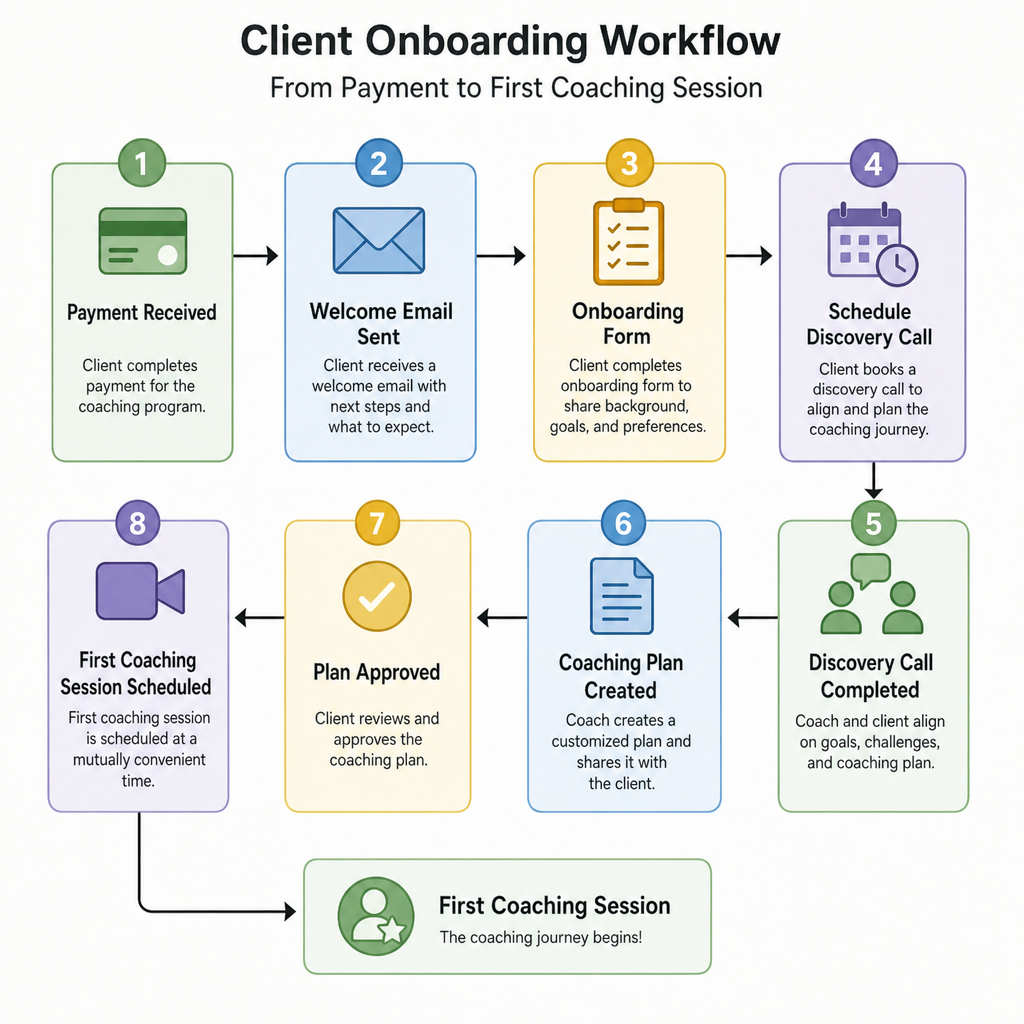
Start by writing down every step that happens from the moment someone becomes a client to the moment they attend their first coaching session. Include both client-facing steps and internal tasks. For example, a client may pay, receive a welcome email, sign an agreement, complete an intake form, book a session, receive reminders, and access preparation materials. Behind the scenes, you may need to review their form, tag them in your CRM, create a client folder, and prepare session notes.
Separate your map into three stages:
- Trigger: the action that starts onboarding, such as payment, signed contract, or manual approval.
- Client experience: the emails, forms, calendar links, resources, and reminders the client receives.
- Internal preparation: the tasks, notifications, tags, and notes that help you coach well.
This map becomes the blueprint for your client onboarding automation. It also reveals unnecessary steps, duplicate messages, and places where clients may get stuck.
2. Choose your onboarding software and connected tools
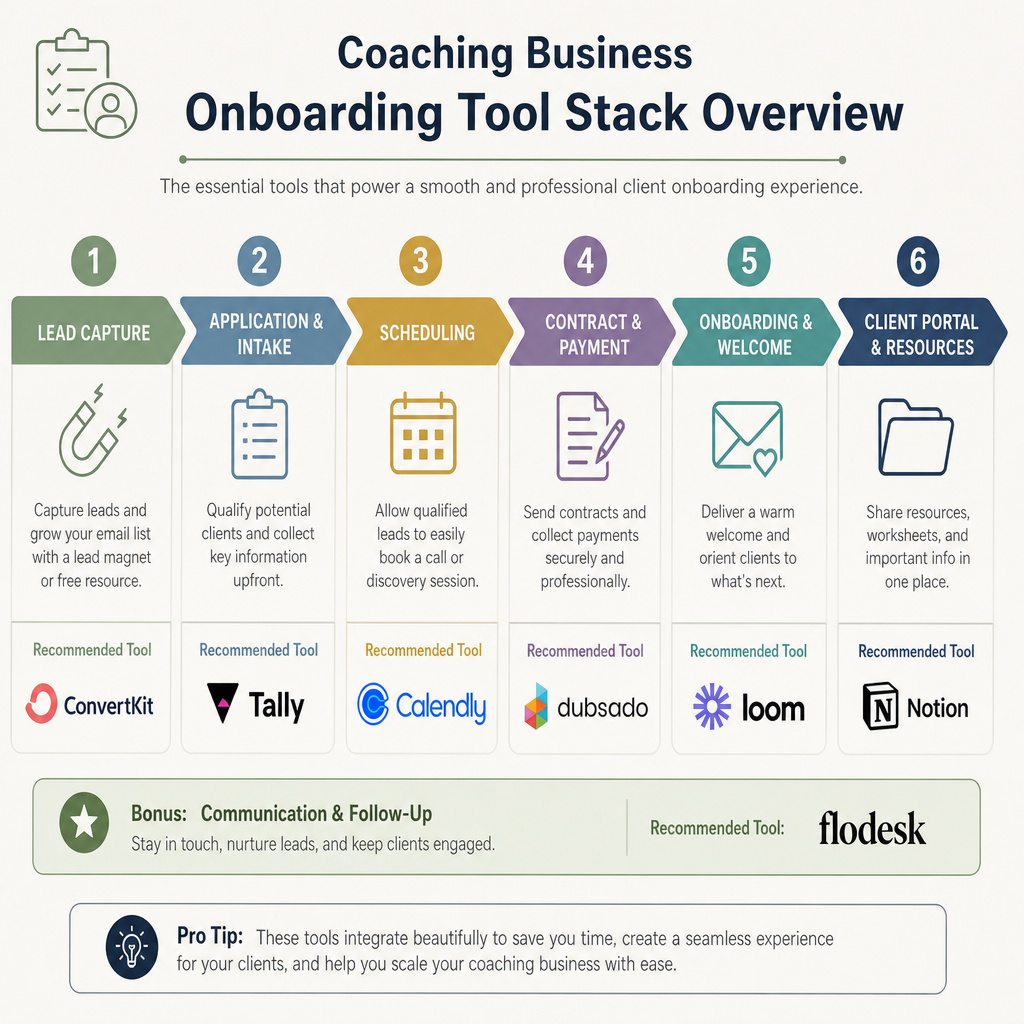
You do not always need a complex platform. Many coaching businesses can automate onboarding with a form tool, scheduler, email platform, payment processor, e-signature tool, CRM, and cloud folder. Others prefer all-in-one onboarding software that combines several of those functions in one workspace.
Choose tools based on your workflow, not on the longest feature list. Your setup should help you:
- Trigger automation when a client pays, signs, or is approved.
- Send personalized emails using the client’s name and program type.
- Collect intake details in a secure, organized format.
- Let clients schedule without back-and-forth messages.
- Assign internal tasks so nothing is forgotten.
- Store resources where clients can easily find them.
- Track onboarding status at a glance.
If you work with sensitive client information, also consider privacy, permissions, and data storage. Coaching can involve personal details, so avoid spreading intake answers across too many tools when a cleaner system would work.
3. Create the trigger that starts onboarding
Every automated workflow needs a clear starting point. For a coaching business, the trigger is usually a completed payment, signed agreement, accepted proposal, or manual status change in a CRM. Pick one official trigger so clients do not accidentally receive duplicate welcome sequences.
For example, you might decide that onboarding begins only when both payment and agreement are complete. In that case, your system can wait until both conditions are met before sending the welcome email. If your process starts after a discovery call, you may use a manual trigger such as moving the client to “New Client” in your pipeline.
A clean trigger protects the client experience. It ensures the client receives the right instructions only when they are truly ready to begin.
4. Send a warm welcome email immediately
Your first automated email should not sound robotic. It should reassure the client, celebrate the next step, and explain exactly what to do now. Keep it short enough to read quickly, but complete enough to reduce uncertainty.
A strong welcome email usually includes:
- A friendly confirmation that their coaching program is active.
- A brief reminder of what they joined or purchased.
- A clear list of next actions, such as signing, completing intake, or booking.
- A link to the client hub or key resources.
- A note about when they can expect a personal response from you.
Use automation to send the email instantly, then personalize where it matters. A sentence like “I’ll review your intake before our first session” feels human and sets a professional tone.
5. Collect intake information with smart forms
The intake form is one of the highest-value parts of onboarding. It helps you understand the client’s goals, context, obstacles, and expectations before the first session. It also helps the client reflect, which can make the coaching conversation more focused from the start.
Keep the form thorough but respectful. Ask only for information you will actually use. Long forms can delay onboarding, especially if the client is excited but busy. Use conditional questions when possible so clients only see fields that apply to their program, challenge, or goals.
Common coaching intake sections include:
- Current situation and desired outcome.
- Previous attempts, patterns, or obstacles.
- Short-term and long-term goals.
- Preferred coaching style and accountability needs.
- Availability, time zone, and communication preferences.
- Relevant background information for the coaching focus.
Once submitted, route the answers somewhere useful. That may be your CRM, client record, project board, or private notes document. The goal is not just to collect data; it is to make the information easy to review before the first call.
6. Automate scheduling and reminders
Scheduling is a perfect use case for workflow automation because it removes back-and-forth coordination. Send clients directly to the correct appointment type, with the right duration, location, buffers, and availability. If you offer multiple programs, create separate scheduling links so each client books the correct first session.
Your reminder sequence should help clients arrive prepared rather than simply nag them. For example, send one confirmation immediately, one reminder a day before, and one shorter reminder shortly before the session. Include the meeting link, rescheduling policy, preparation instructions, and any documents they should review.
Be careful not to over-message. Too many reminders can make onboarding feel noisy. Each message should serve a practical purpose.
7. Deliver resources in a simple client hub
New clients should not have to search through emails to find important materials. Create one reliable place for onboarding resources, whether that is a portal, shared folder, course area, or project workspace. Then use your automation to send access at the right time.
Your client hub might include:
- Welcome guide or orientation video.
- Program overview and milestone timeline.
- Session preparation worksheet.
- Coaching agreement or policies.
- Communication guidelines.
- Links to book sessions or submit questions.
- Relevant exercises, templates, or recordings.
The hub does not need to be fancy. It needs to be clear, organized, and easy to revisit. Label resources with plain names so clients know what to open first.
8. Add internal tasks and quality checks
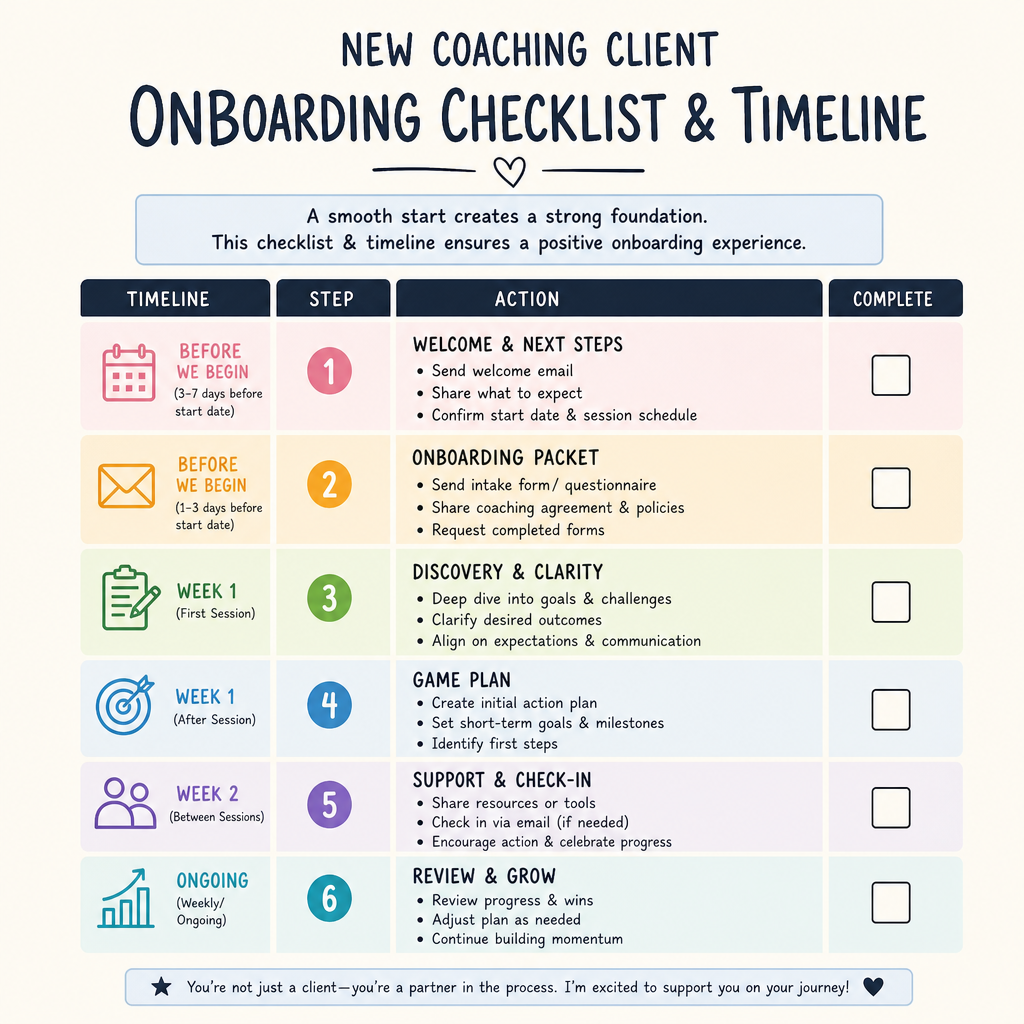
Automation should support your delivery, not just the client’s inbox. Add internal notifications so you know when a client completes an intake form, books a session, misses a step, or needs manual attention. This is where client onboarding automation becomes a business operations tool instead of just an email sequence.
Create internal tasks such as:
- Review intake form before the first session.
- Add notes to the client profile.
- Confirm payment or agreement completion if needed.
- Prepare the first-session agenda.
- Check whether the client accessed key resources.
- Send a personal note if the client has not completed required steps.
Build in a short testing phase before you use the workflow with real clients. Run through the process with a test contact, click every link, submit each form, book a sample session, and check every notification. Small errors feel bigger when a new client is waiting for instructions.
Personalize the experience without doing everything manually
Automation works best when it handles predictable steps and leaves room for human connection. Use personalization fields for names, program types, session dates, and relevant resources. Segment your workflow by offer so a leadership coaching client, wellness coaching client, or group program member receives the right instructions.
Add one or two intentional personal touchpoints. For example, you might send a brief custom voice note after reviewing the intake form or add a personal comment to the first-session agenda. These touches stand out because the repetitive logistics are already handled.
A balanced onboarding workflow might look like this:
- Automated payment confirmation.
- Automated welcome email.
- Automated intake form and scheduling link.
- Automated reminders.
- Manual review of intake answers.
- Personal pre-session note from the coach.
- Automated resource delivery.
- Manual first-session preparation.
This blend keeps your business efficient while preserving the trust that coaching depends on.
Measure and improve the workflow over time
Your first version does not need to be perfect. After a few clients move through the system, look for friction. Are clients skipping the intake form? Are they booking the wrong session type? Are they asking the same question by email? Each repeated issue is a signal that your onboarding copy, form, or automation needs adjustment.
Track simple indicators:
- Time from payment to booked first session.
- Intake form completion rate.
- Number of reminder or clarification emails needed.
- Missed appointments or late reschedules.
- Client questions during the first session.
- Internal tasks completed on time.
Use these observations to refine your workflow automation. Shorten confusing emails, rename unclear buttons, adjust reminder timing, or split a long form into stages. Continuous improvement makes onboarding smoother without requiring a full rebuild.
Common mistakes to avoid
Avoid automating too much too soon. A complicated workflow with dozens of branches is harder to maintain and easier to break. Start with the core journey, then add refinements once you understand real client behavior.
Also avoid vague instructions. “Complete your onboarding” is less helpful than “Complete the intake form and book your first session by Friday.” Clients move faster when they know exactly what action to take and why it matters.
Finally, do not let automation replace your relationship. Coaching is personal. Your onboarding system should create clarity and confidence so your human interactions can be deeper, not so clients feel processed through a machine.
Need Help Systemizing Your Coaching Business Onboarding?
If onboarding still depends on you remembering every step, it's time to map the process and build a repeatable workflow. My business automation systems are built around exactly this kind of seamless client journey, and the CRM and lead management side keeps every client's onboarding status visible.
See the Business Automation Systems I Build for Coaches →
Frequently Asked Questions
Quick answers to the most common questions about this topic.
Automate scheduling, contracts, onboarding, and follow-up so you stop doing robot work and get back to coaching. done-for-you business automation systems.
Related Articles
Hiring a Funnel and Automation Expert for Your Coaching Business: Everything You Need to Know
A strong coaching business needs more than great sessions. Hiring a funnel and automation expert can help connect your strategy, offers, emails, calendars, and client workflows.
AutomationHow to Automate Appointment Reminders for a Coaching Business
Missed appointments cost coaching businesses time, energy, and momentum. Learn how to automate appointment reminders to reduce no-shows and keep clients prepared.
AutomationHow to Automate your Coaching Business
Automating a coaching business means using repeatable systems and software to handle the routine work: scheduling, intake, payments, reminders, and client follow-up. Here is how to do it right.