How to Automate your Coaching Business

Kara Leanne
Scalable Coaching Systems Expert · Updated August 28, 2026
Scalable Coaching Systems builds affordable, done-for-you automation systems for online coaches — so you stop doing robot work and get back to coaching.
Get a Free Funnel Strategy →Automating a coaching business means using repeatable systems and software to handle the routine work that keeps your practice running: scheduling, intake, payments, reminders, client follow-up, content delivery, progress tracking, and reporting.
The goal is not to remove the human side of coaching; it is to protect it by reducing admin time, missed messages, duplicated tasks, and inconsistent client experiences. With the right coaching business automation setup, you can serve clients more smoothly while keeping your attention on transformation, accountability, and relationship-building.
What Does Automation Mean for a Coaching Business?
Automation in a coaching business means creating workflows that move clients from one step to the next without you manually managing every detail. A prospective client can book a discovery call, receive a confirmation email, complete an intake form, get reminders, pay an invoice, join a program, and receive onboarding materials through a connected system rather than a chain of one-off messages.
For coaches, automation is most useful when it supports a clear client journey. If your process is messy offline, software will usually make the mess faster, not better. Before choosing tools, it helps to map what actually happens from the moment someone discovers you to the moment they renew, complete a program, or refer someone else.
The best automation feels personal, timely, and helpful. A reminder before a session can reduce no-shows. A welcome sequence can help new clients feel prepared. A progress check-in can encourage reflection between calls. None of these replaces your expertise, but each one makes your coaching experience more consistent.
The Client Journey Is the Foundation
A coaching business is built around trust, and trust is shaped by every touchpoint. Automation works best when each touchpoint has a purpose. Instead of asking, “What can I automate?” start by asking, “Where do clients need clarity, support, or momentum?”
Most coaching journeys include several stages:
- Discovery and lead capture: Someone finds you through a referral, search, social content, a podcast, an event, or a landing page. Automation can help them request a consultation, download a resource, or join your email list.
- Qualification and booking: A form can gather goals, challenges, budget expectations, availability, and fit indicators before a call. Scheduling automation removes the back-and-forth of finding a time.
- Enrollment and payment: Once a client says yes, automation can send an agreement, payment link, invoice, receipt, and onboarding instructions.
- Onboarding and preparation: New clients may need forms, assessments, program access, calendar invites, expectations, and first-session instructions. Automating these steps reduces confusion and sets a professional tone.
- Delivery and accountability: Session reminders, post-call notes, homework prompts, habit tracking, resource libraries, and milestone check-ins keep clients engaged between sessions.
- Retention, renewal, and referrals: Near the end of a package, automation can prompt a progress review, renewal conversation, testimonial request, or referral invitation.
When these stages are clear, coaching business software becomes easier to evaluate. You are not buying features at random; you are choosing tools that support a journey you already understand.
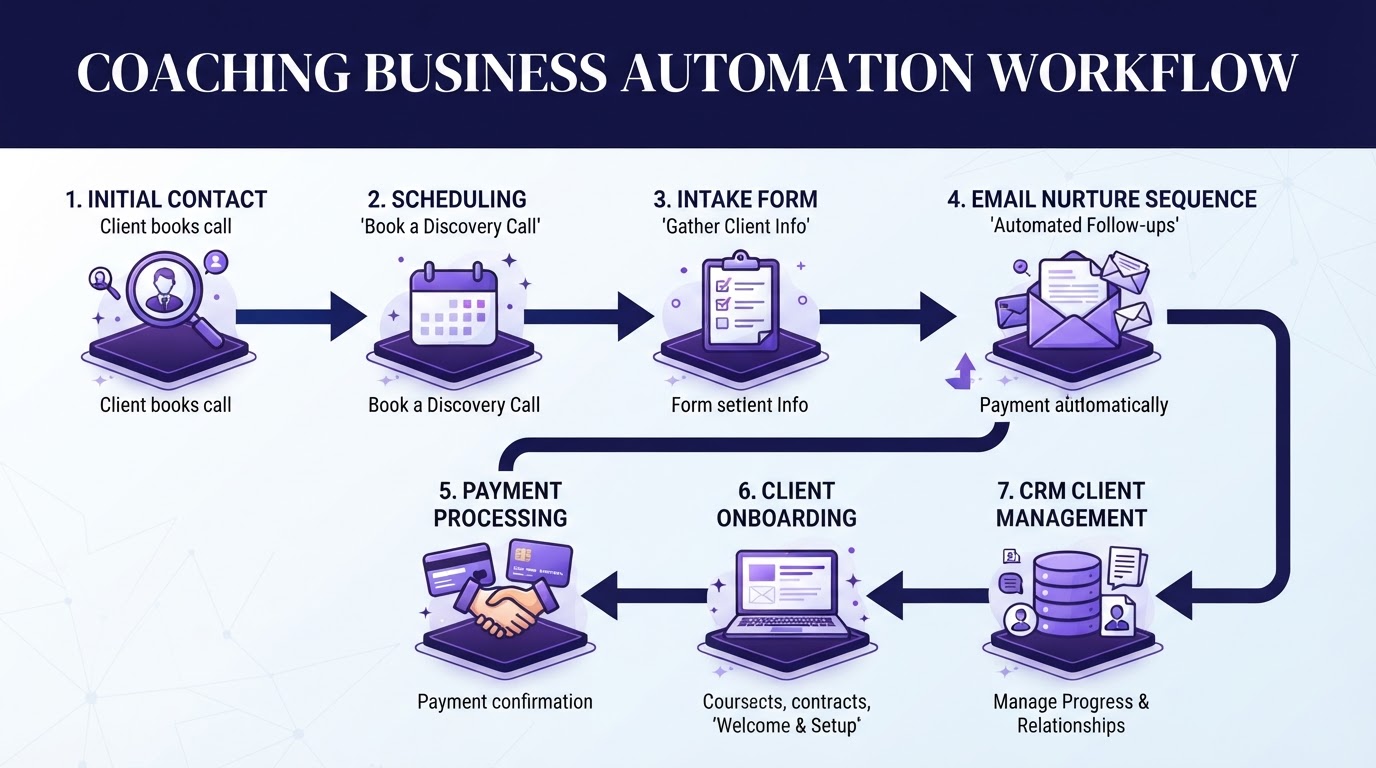
Coaching business automation framework: Connecting discovery, booking, onboarding, and client retention.
Start With the Tasks That Cost the Most Time
Not every task should be automated first. The smartest starting point is usually the repetitive work that happens often, follows the same pattern, and does not require your judgment every time. This gives you quick operational relief without risking the quality of your coaching.
Good first automation targets include:
- Appointment scheduling: Allow clients to book from approved availability, reschedule within your rules, and receive automatic reminders.
- Intake forms: Collect background information, goals, health or lifestyle details where relevant, and consent before the first session.
- Payment collection: Send payment links, recurring billing, receipts, or package invoices without manually chasing every transaction.
- Session reminders: Reduce no-shows and late arrivals with email or SMS reminders.
- Welcome emails: Deliver expectations, login instructions, preparation steps, and next actions immediately after enrollment.
- Resource delivery: Give clients access to worksheets, videos, guides, recordings, or exercises based on their program stage.
- Follow-up prompts: Remind clients to complete reflections, track habits, submit questions, or review action items.
Tasks that need more care include sales conversations, sensitive client feedback, program design, and moments when a client needs emotional support. These can be supported by automation, but they should not feel robotic.
Coaching Business Software Categories to Understand
There is no single perfect tool for every coach. A solo executive coach, a group fitness coach, a nutrition coach, and a growing coaching company may need different systems. Still, most coaching software falls into a few practical categories.
Scheduling and Calendar Tools
Scheduling tools let clients choose from your available times without sending multiple emails. They handle time zones, buffer times, cancellation windows, reminders, and calendar syncing.
Client Relationship Management (CRM) Systems
A coaching CRM helps you track leads, prospects, active clients, past clients, and referral sources. It shows where someone is in your pipeline and what needs to happen next.
Email Marketing and Nurture Platforms
Email automation helps you stay visible before someone becomes a client and supportive after they join. For active clients, sequence triggers can support onboarding, weekly focus topics, and progress reflections. Learn more on our email marketing setup page.
Payments, Contracts, and Billing Tools
Payment automation makes enrollment easier and reduces awkward follow-up. Depending on your business model, you may need one-time payments, recurring subscriptions, payment plans, invoices, or package billing.
Course, Community, and Program Delivery Platforms
If your coaching includes group programs, self-paced lessons, or resource libraries, a delivery platform helps organize content and release modules on set schedules.
Forms, Assessments, and Tracking Tools
Forms support intake, goal setting, weekly check-ins, habit tracking, and evaluations. If you're evaluating the best software for health coaching business automation, pay extra attention to secure intake, habit tracking, and client privacy.
How Do You Choose the Right Automation Tools?
Choose tools by starting with your business model, client journey, privacy needs, and current operational bottlenecks. Use this checklist:
Client experience: Is it easy for clients to book, pay, submit forms, and access resources?
Workflow fit: Does it support how you actually sell, onboard, coach, and retain clients?
Integrations: Can it connect with your calendar, email, payment processor, website, or video platform?
Automation depth: Can it trigger actions based on bookings, forms, payments, tags, or program stages?
Ease of maintenance: Can you update it without needing technical help every time your offer changes?
Build Your Automation Workflow Step by Step
Trying to automate your entire business at once creates friction. Build one reliable workflow, test it, then expand:
- Step 1: Map your current process — Write out every step from inquiry to completion.
- Step 2: Standardize before you automate — Create templates for confirmation emails, intake forms, proposals, and welcome sequences.
- Step 3: Choose one core system — Track client status in a single central system.
- Step 4: Create triggers and actions — Use simple "when this happens, do that" rules.
- Step 5: Test the client experience — Test the workflow yourself as a client to catch broken links or awkward timing.
Automations That Create a Better Coaching Experience
High-value workflows that improve client momentum:
- Discovery call workflow: Lead fills out a short form, books a call, gets preparation questions, and receives a reminder.
- New client onboarding: Instant welcome message, agreement, receipt, intake form, and session preparation details.
- Weekly accountability: Prompts for clients to review goals and submit priorities before call day.
- Milestone reviews & re-engagement: Prompts near the end of a package to reflect on progress and discuss renewals.
Common Mistakes to Avoid
- Automating an unclear offer or messy offline process
- Sending too many automated reminder messages
- Using generic templates without editing in your brand voice
- Collecting unnecessary information on long intake forms
- Failing to review and update workflows as offers evolve
A Practical Automation Plan for the Next 30 Days
Week 1: Audit & Prioritize
List recurring admin tasks and choose one primary workflow to improve first (e.g. discovery call booking or onboarding).
Week 2: Standardize Materials
Create or refine intake questions, welcome emails, and follow-up templates with clear, friendly language.
Week 3: Set Up Software
Build the workflow in your central system. Connect calendar, forms, and payments with simple trigger logic.
Week 4: Test & Launch
Run test bookings, review with a test client, gather feedback, and refine before automating the next process.
Measuring Whether Automation Is Working
Look for these practical indicators:
- Fewer back-and-forth scheduling emails
- Faster response times for new inquiries
- Zero missing intake forms, payments, or onboarding steps
- Better attendance for coaching calls and sessions
- More time saved for coaching, content, and revenue generation
Automation Should Make Your Coaching Feel More Personal
A well-automated coaching business does not feel cold—it feels organized, responsive, and intentional. If you want custom help building these exact systems in your practice, explore our business automation service or grab our free 6-Figure Scalable System Blueprint.
Frequently Asked Questions
Quick answers to the most common questions about this topic.
Automate scheduling, contracts, onboarding, and follow-up so you stop doing robot work and get back to coaching. done-for-you business automation systems.
Related Articles
Hiring a Funnel and Automation Expert for Your Coaching Business: Everything You Need to Know
A strong coaching business needs more than great sessions. Hiring a funnel and automation expert can help connect your strategy, offers, emails, calendars, and client workflows.
AutomationHow to Automate Appointment Reminders for a Coaching Business
Missed appointments cost coaching businesses time, energy, and momentum. Learn how to automate appointment reminders to reduce no-shows and keep clients prepared.
AutomationHow to Automate Client Onboarding for Your Coaching Business
A strong coaching relationship starts before the first session. Learn how to build a client onboarding automation workflow using forms, schedulers, and client portals.