What Should an Online Coach Automate? 10 Things to Start With

Kara Leanne
Scalable Coaching Systems Expert · Updated June 24, 2026
Scalable Coaching Systems builds affordable, done-for-you automation systems for online coaches — so you stop doing robot work and get back to coaching.
Get a Free Funnel Strategy →Online coaching automation helps you spend less time chasing admin tasks and more time coaching, selling, and improving client outcomes. The right setup connects your virtual coaching tools, online coaching software, calendar, email, forms, payment system, and client workspace so routine steps happen without constant manual follow-up.
The goal is not to remove the human side of coaching. It is to automate the repeatable parts of your client journey so your attention goes where it matters most.
What should an online coach automate first?
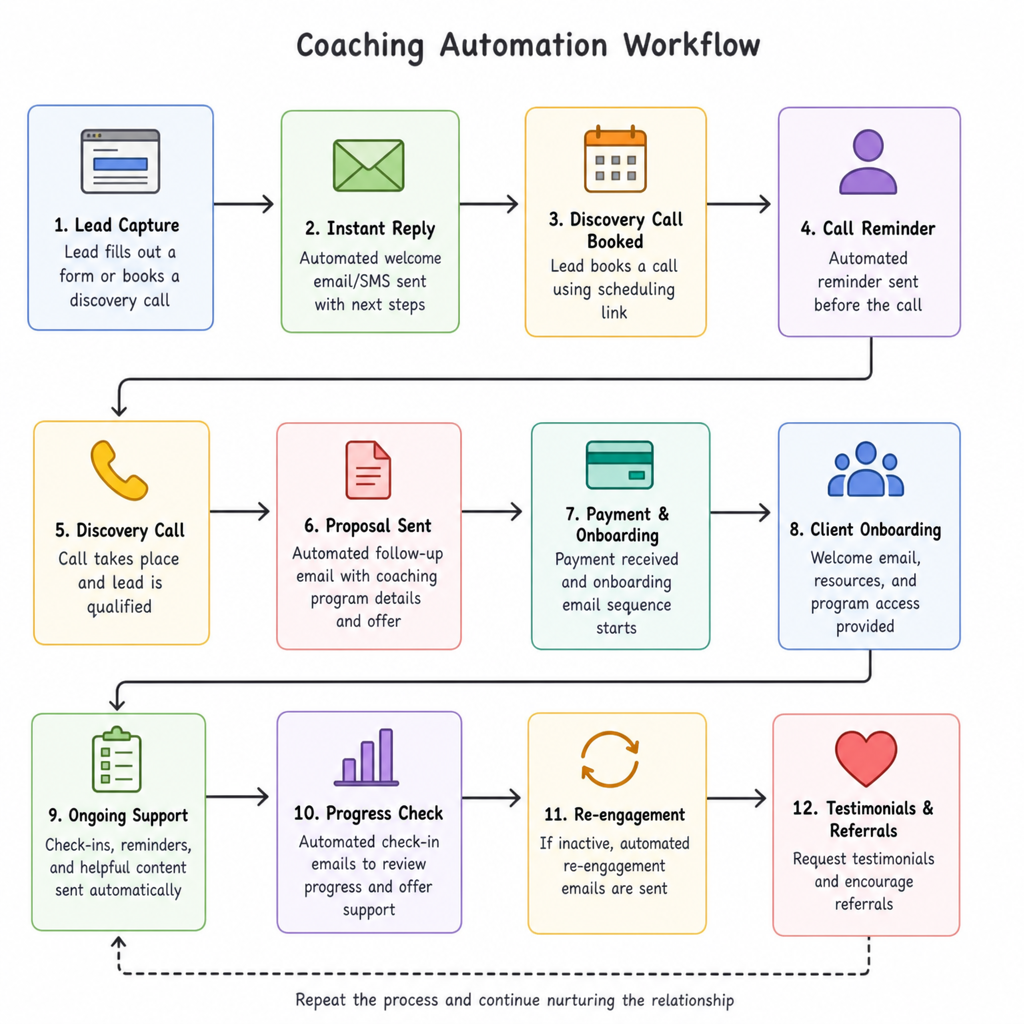
Start with the tasks that are predictable, repetitive, and easy to standardize. For most US-based online coaches, that means lead capture, booking, reminders, payments, onboarding, check-ins, content delivery, progress tracking, testimonials, and re-engagement. These areas create the most friction when handled manually, and they are usually easy to improve with online coaching software or simple connected apps.
A good rule: automate the workflow, not the relationship. If a task requires empathy, judgment, sensitive feedback, or strategic coaching, keep it personal. If it follows the same steps every time, it is a strong candidate for online coaching automation.
1. Lead capture from your website and social channels
Your first automation should collect new leads in one place. Instead of copying names from contact forms, DMs, webinar signups, or free resource downloads, connect those entry points to your email platform or CRM. This makes sure every interested person is added to the right list with the right tag.
For example, a fitness coach might tag leads by goal, such as strength training, weight loss, or mobility. A business coach might tag leads by stage, such as startup, scaling, or leadership. These simple labels help you send more relevant follow-up without writing every message from scratch.
Automate:
- Website form submissions
- Free guide or quiz opt-ins
- Webinar or challenge registrations
- CRM contact creation
- Lead source tagging
- Internal notifications when a high-fit lead comes in
This creates a cleaner pipeline and reduces the risk of missing a potential client because their message is buried in an inbox.
2. Discovery call scheduling
Scheduling is one of the easiest wins for an online coach. A booking tool lets prospects choose from your available times, answer basic intake questions, and receive calendar invites automatically. It removes the back-and-forth emails that often slow down sales conversations.
Your scheduling flow should also protect your calendar. Add buffers between calls, limit daily call volume, and ask pre-call questions that help you understand whether the person is a fit. If your coaching business serves clients across US time zones, make sure your booking page displays times clearly for each visitor.
Automate:
- Calendar availability
- Time zone handling
- Pre-call questions
- Confirmation emails
- Video meeting links
- Reminder emails and texts if your tool supports SMS
- Rescheduling links
A smooth booking process makes your business feel professional before the first conversation even starts.
3. Pre-call nurture emails
Not everyone who books a call is ready to buy. A short pre-call sequence can help prospects understand your approach, prepare better questions, and show up with clearer expectations. This is especially useful for higher-ticket coaching, group programs, or long-term packages.
Keep the sequence helpful, not pushy. Send a short message that confirms what to expect, one message that shares your coaching philosophy, and one reminder that asks them to reflect on their goals before the call. If you use virtual coaching tools that support segmentation, customize these messages based on the offer they selected.
A simple pre-call flow can include:
- Immediately after booking: confirmation and next steps
- 24 hours before: reminder and preparation prompt
- 2 hours before: quick reminder with meeting link
- After no-show: rescheduling option
This reduces no-shows and helps your sales calls become more focused.
4. Payment collection and invoices
Manual payment follow-up can become awkward and time-consuming. Automating payments makes enrollment easier for clients and keeps your cash flow more predictable. Use a secure payment platform that can handle invoices, payment plans, receipts, and failed-payment notices.
For US audiences, clients often expect options like credit card, ACH, or digital wallet payments depending on the offer and platform. You do not need to offer every option, but the process should be clear and easy. After a client pays, your system can automatically send a receipt, trigger onboarding, and update their status in your client management system.
Automate:
- Invoice creation
- Payment links
- Recurring payments or payment plans
- Receipts
- Failed-payment reminders
- Client status updates
- Access to paid resources after purchase
This is one of the most practical uses of online coaching automation because it reduces admin work while improving the client experience.
5. Client onboarding
A strong onboarding process helps new clients feel confident right away. Instead of sending scattered emails, build a repeatable welcome flow that gives clients everything they need to begin. This can include intake forms, program expectations, scheduling instructions, community links, and first-session prep.
Onboarding should feel personal even when automated. Use friendly language, include your own short welcome video if appropriate, and explain why each step matters. The best online coaching software lets you send the right onboarding steps based on what the client purchased.
A simple onboarding checklist includes:
- Welcome email with a clear next step
- Coaching agreement or policy acknowledgment
- Intake questionnaire
- Baseline assessment or goal-setting form
- Client portal access
- First session booking link
- Program roadmap or expectations
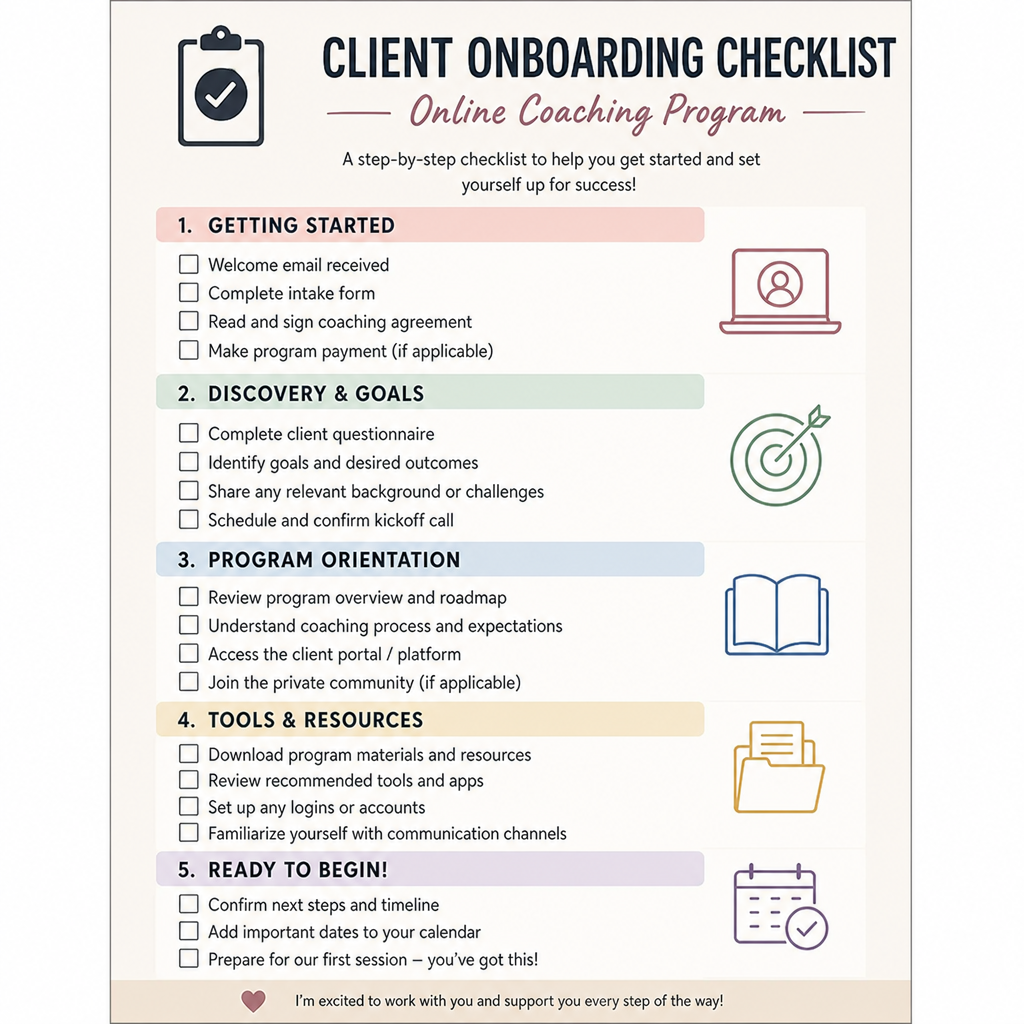
The benefit is consistency. Every client gets the same professional start, and you do not have to rebuild the process each time.
6. Session reminders and follow-up notes
Clients are more likely to show up prepared when reminders are automatic. Send reminders before sessions with the meeting link, agenda prompt, and any materials they need. After the session, send a follow-up email that points them to notes, action items, or homework.
You can still personalize the actual coaching notes. The automation simply makes sure the delivery happens. For example, you might use a reusable follow-up template, then add the client’s specific action steps before sending.
Automate:
- Session reminders
- Meeting links
- Prep prompts
- Post-session recap templates
- Homework links
- Next-session reminders
This keeps clients engaged between sessions, which is where much of the real progress happens.
7. Client check-ins and accountability prompts
Check-ins are a natural fit for automation because they usually follow a set rhythm. Weekly forms, quick rating scales, habit trackers, or reflection prompts can help you see how clients are doing without relying on memory or scattered messages.
The key is to keep check-ins short enough that clients will actually complete them. Ask questions that help you coach better, not questions that create busywork. For example, ask what went well, what felt hard, what support they need, and what they commit to next.
Useful check-in automations include:
- Weekly progress forms
- Habit or goal tracking prompts
- Client self-ratings
- Missed check-in reminders
- Alerts when a client reports a problem
- Summary views before coaching sessions
This gives you better context and helps clients stay accountable between live calls.
8. Resource and lesson delivery
If your coaching program includes worksheets, videos, templates, recordings, or weekly lessons, automate delivery so clients receive the right material at the right time. This avoids overwhelming clients with everything at once and keeps the program moving in a clear sequence.
For example, a career coach might release resume materials first, then interview prep, then negotiation resources. A health coach might send habit foundations before advanced meal planning. Dripped content can make the experience feel organized and manageable.
Automate:
- Welcome resources
- Weekly lesson releases
- Worksheet delivery
- Replay emails
- Resource library access
- Completion reminders
This is where virtual coaching tools can make your offer feel more polished, especially if you run group programs or evergreen coaching products.
9. Progress tracking and milestone alerts
Clients want to see progress. Coaches need a clear way to monitor it. Automating progress tracking helps both sides notice wins, spot problems, and stay focused on the original goal.
You can track simple milestones, such as completed sessions, submitted assignments, goal updates, or habit streaks. You can also set alerts for signs that a client may need support, such as missed check-ins or long gaps in activity. The point is not to micromanage; it is to notice patterns before they become bigger issues.
Automate:
- Goal updates
- Assignment completion
- Milestone emails
- Client inactivity alerts
- End-of-month progress summaries
- Internal reminders to review client status
When used well, this kind of automation makes your coaching feel more attentive, not less personal.
10. Testimonials, referrals, and re-engagement
After a client completes a program or reaches a milestone, automate the next step. This might be a testimonial request, referral invitation, renewal conversation, alumni offer, or check-in email a few months later.
Timing matters. Ask for feedback when the experience is fresh and the client can describe what changed. Make the request easy by giving prompts, such as what problem they had before coaching, what shifted, and what they would tell someone considering the program.
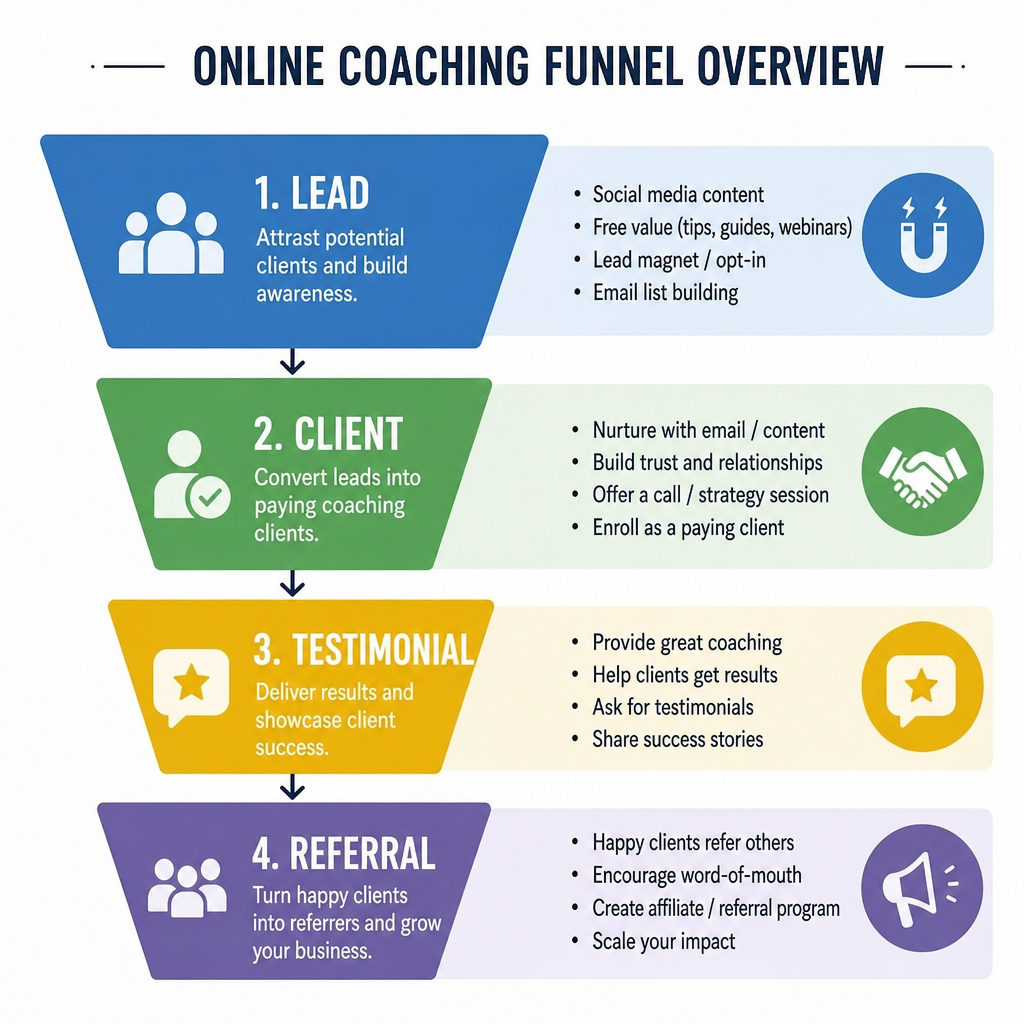
Automate:
- End-of-program surveys
- Testimonial requests
- Referral prompts
- Renewal reminders
- Alumni newsletters
- Re-engagement campaigns for past leads
This helps you continue the relationship without depending on memory or manual follow-up.
What to keep manual
Some parts of coaching should stay human. Automation can support your process, but it should not replace the judgment, empathy, and presence that clients pay for. Keep sensitive conversations, coaching feedback, offer recommendations, and conflict resolution manual.
You should also review any automated message that could affect trust. For example, a failed-payment reminder can be automated, but the tone should be respectful. A progress alert can be automated, but your response should consider the person’s context.
Keep these manual or highly personalized:
- Deep coaching conversations
- Strategy recommendations
- Feedback on sensitive client issues
- Sales calls and fit decisions
- Program changes for individual clients
- Crisis-related communication
- Relationship repair if a client is unhappy
The best automation makes you more available for these moments.
Where to start
Do not try to automate your entire coaching business in one weekend. Start with the workflow that wastes the most time or causes the most dropped balls. For many coaches, that is scheduling, onboarding, or payment follow-up.
Choose one process, write down each step, and decide what should happen automatically. Then test it with a real client or lead before building the next workflow. Simple and reliable beats complex and fragile.
A practical starting plan:
- Pick one repeatable process.
- List every step from start to finish.
- Mark which steps require your personal attention.
- Automate the remaining steps with your existing tools.
- Test the flow yourself.
- Send it to one real client or prospect.
- Improve the wording, timing, and triggers.
- Move to the next workflow only after the first one works.
If you are choosing online coaching software, look for tools that can support your client journey without adding unnecessary complexity. A coach with a few private clients may only need scheduling, payments, email, and forms. A coach running cohorts or memberships may need a client portal, content delivery, community features, and deeper reporting.
Common questions
Frequently Asked Questions
Quick answers to the most common questions about this topic.
Build systems that protect your coaching time
Online coaching automation works best when it supports a clear client journey. Start with the ten areas above, improve one workflow at a time, and keep the personal parts personal. With the right virtual coaching tools and a simple plan, you can reduce admin work, deliver a more consistent experience, and create more space for the coaching your clients actually came for.
Automate scheduling, contracts, onboarding, and follow-up so you stop doing robot work and get back to coaching. done-for-you business automation systems.
Related Articles
Hiring a Funnel and Automation Expert for Your Coaching Business: Everything You Need to Know
A strong coaching business needs more than great sessions. Hiring a funnel and automation expert can help connect your strategy, offers, emails, calendars, and client workflows.
AutomationHow to Automate Appointment Reminders for a Coaching Business
Missed appointments cost coaching businesses time, energy, and momentum. Learn how to automate appointment reminders to reduce no-shows and keep clients prepared.
AutomationHow to Automate Client Onboarding for Your Coaching Business
A strong coaching relationship starts before the first session. Learn how to build a client onboarding automation workflow using forms, schedulers, and client portals.